Problem
Some users may encounter the following error when launching Tech2Win with the Vxdiag Nano for GM:
Error E668150
Tech2Win is exiting with an error code -1 (parsing of program arguments failed)
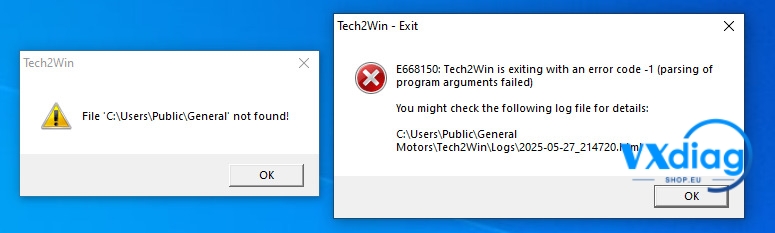
This error typically occurs when a required BIN file is missing or not located in the correct directory.
Solution
To resolve the issue, follow these steps:
Step 1: Download the BIN File
Download the BIN file provided by technical support.
Step 2: Extract the File
Extract the downloaded BIN file.
Step 3: Copy the File to the Correct Folder
Copy or extract the BIN file to the following directory:
C:\Program Files (x86)\General Motors\Tech2Win
Step 4: Restart Tech2Win
After the file has been copied successfully, restart Tech2Win and check whether the error has been resolved.
Result
Once the BIN file is placed in the correct Tech2Win installation folder, the software should launch normally without displaying Error E668150.
If the issue persists after following the steps above, please contact technical support for further assistance.
For more Vxdiag troubleshooting guides and technical support, visit: